Shared reminders for the things you do together
A shared reminder gives both of you somewhere to put the next small task, who is handling it, and when it matters. Here is how to turn a shared list into something useful in everyday life.
What makes a reminder shared?
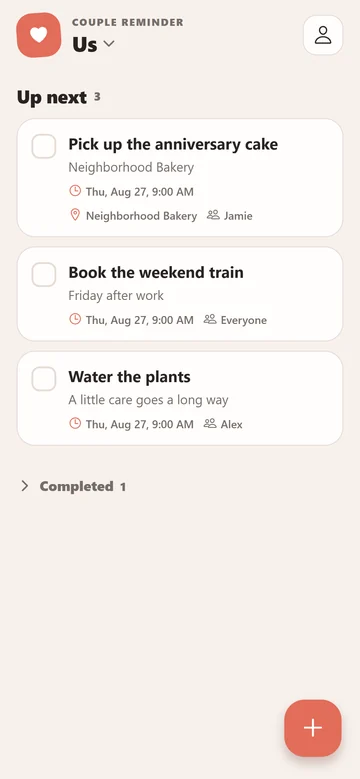
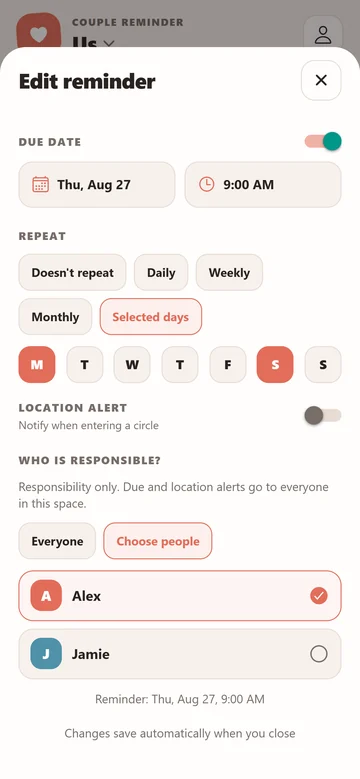
In Couple Reminder, reminders live inside a shared space. You and your partner join the same space to see its saved tasks and sync your changes. A reminder can have a title, a note, a due date, a location alert and people responsible for it. You do not need to give every item a deadline: some things simply need a place where both of you can find them.
Start with one space called Home or Us. Keep it for things you have agreed to share, and make titles specific enough that the other person can act without another message. “Buy oat milk and coffee” gives more context than “Shopping.”
Four useful ways to start
- Groceries: add what you need while you notice it, with quantities or preferences in the note. Mark the reminder complete when the shopping is done so the shared list can reflect that after syncing.
- Chores: turn “we should sort that out” into one clear action, such as “Take the recycling out.” Choose who is responsible and add a due date when there is a real deadline.
- Appointments: keep the time and practical details together. A note such as “Bring the booking number” is easier to find alongside the reminder than in an older conversation.
- Dates and plans: remember the preparation as well as the event. “Book a table for Friday” is a different task from attending dinner, so give it its own reminder.
A useful starting habit is to review the list together and remove tasks you no longer intend to do. Having the same list helps only when you agree on what its items mean.
Responsibility and notifications are separate
The Who is responsible? setting lets you choose Everyone or specific people. It records who is handling the task; it does not restrict all alerts to that person. Both partners can receive a timed reminder when their notifications are enabled.
Choose a due date for something that matters at a particular time. For an errand that matters when you reach a place, use a location reminder. Each phone detects its own arrival in the saved area. Your partner does not receive an arrival alert just because your phone entered it.
Connect both phones
Install Couple Reminder on both phones, create a shared space on one, and invite your partner with its QR code or 8-character invitation code. Both phones need an internet connection for setup and syncing. No email or password is required; the app creates an account automatically for the device. Couple Reminder is free with ads.
If you use different phones, follow the iPhone and Android setup guide. Before relying on an important reminder, create a simple test item and check that both of you can see it and receive the notifications you want.
What happens without internet?
You can view and edit saved reminders offline; changes sync when you reconnect. Your partner cannot see an unsynced edit on your phone. If you both change the same reminder, review any conflict shown in the app before replacing another person's version.
Need help with a missing task or an alert? The support page explains what to check and how to contact us. Include your phone type and app version, without sending private reminder text.