A space for the two of you
Keep groceries, appointments, chores, and plans in one shared place. Both partners can add and complete reminders.
The groceries. The appointment. That little thing you promised. Keep it together with Couple Reminder, on iPhone and Android.
Free with ads. No subscription. Just a shared space to start.
See how it works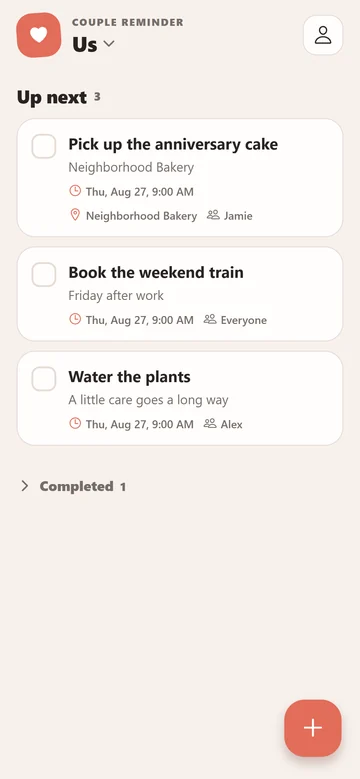
One shared place for the things you need to do, with reminders that fit your day.
Keep groceries, appointments, chores, and plans in one shared place. Both partners can add and complete reminders.
Choose a due time. Both partners can receive the reminder when notifications are enabled.
Save a location for an errand. Get a reminder when your phone enters the area, with location permissions enabled.
No email or password required. Invite your partner by QR or code, then start with one thing you want to remember.
View and edit saved reminders without internet. Reconnect to sync changes with your partner.
Use Couple Reminder on iPhone or Android without a subscription. Ads help support the app.
Install the app and create a space while online. Give it a name that feels like yours.
Your partner installs the app, then scans the invitation or enters its code to join.
Choose what needs doing and when. Enable notifications on each phone for timed alerts.
Practical ways to share the remembering, and help when you need it.
Make shared reminders useful for groceries, chores, appointments and dates. Learn how Couple Reminder connects a shared list with responsibility and alerts.
Read the guide Two phones, one shared spaceSet up Couple Reminder on iPhone and Android with one shared space. Learn invitations, notification checks, offline syncing and what to try if a task is missing.
Read the guide Remember it when you get thereRemember errands when your phone enters a saved area. Learn Couple Reminder location alerts, permissions, circle setup and why your partner's arrival is different.
Read the guideYes. Couple Reminder is free with ads on iPhone and Android. No subscription is required.
No email or password is required. The app creates an anonymous account in the background to connect your device to shared spaces. Both people need the app and an internet connection to create or join a space.
Couple Reminder is available for iPhone and Android. Join the same space with a QR invitation or code to share reminders. Read the setup guide.
Both partners can receive timed reminders when notifications are enabled for their devices and the space. Location alerts work differently: each phone is reminded when it enters a saved area. One partner arriving somewhere does not send an arrival alert to the other partner.
You can view and edit reminders already saved on your device. Changes sync when you reconnect; your partner will not see an offline edit until it has synced. Creating or joining a shared space needs an internet connection.
Shared reminders and space membership are synced through service providers so members can access them. The app also uses advertising and notification providers. No email or password signup does not mean that no data is processed. Read the privacy policy.
Download Couple Reminder on both phones. Create a space, invite your partner, and add your first shared reminder.
Free with ads · No email or password required